
30 Sep Get Your BIR Seal Badge Before the Deadline: A Guide for Online Sellers
Do you know how to get BIR registration seal badge approval sorted out before the deadline runs out? The Bureau of Internal Revenue has extended the deadline for online businesses to display their registration seal badge until October 31, 2026. That gives ecommerce owners about a month, and with the busy holiday selling season right around the corner, it is not a task you want hanging over your head. This guide walks you through what the badge is, who needs one, what to prepare, the exact route to generating it, and how to display it so it helps your store instead of just satisfying a rule.
What the Registration Seal Badge Actually Is
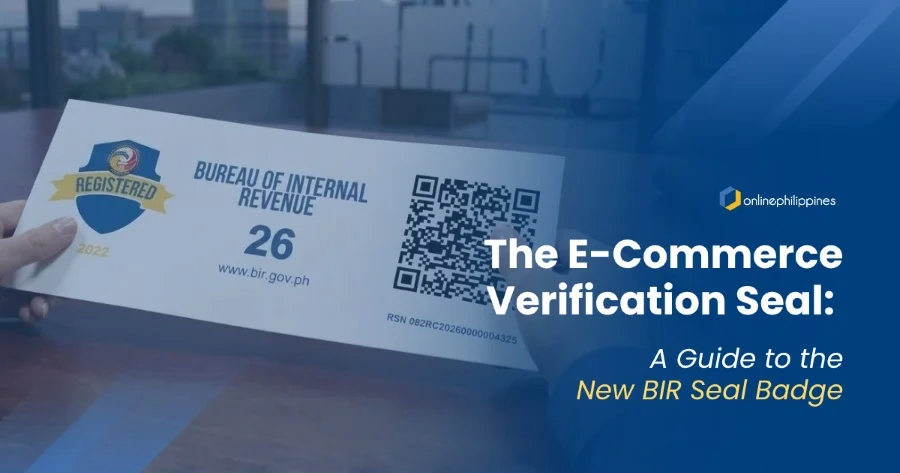
The registration seal badge is a small image with a QR code that proves your online business is registered with the BIR. Before it existed, online businesses were told to post electronic copies of their certificates of registration, and concerns over the information exposed in those certificates led the BIR to switch the requirement to the badge through RMC 38-2026. Posting a full certificate can reveal details like your taxpayer number and business address to anyone who looks. The badge solves that by letting shoppers scan the code and confirm you are registered, without your private details sitting on a public page.
For a growing online business, this is worth more than a compliance checkbox. Customers who are unsure about a new store often look for signs that it is legitimate, and a scannable proof of registration is one of the strongest signs you can offer. Sellers who display it early get the trust benefit while competitors are still scrambling.
Who Needs to Get One
The requirement is broader than many sellers assume. It applies to online sellers, online merchants, digital platform operators, and other covered taxpayers, with display expected on websites, e-commerce or marketplace pages, social media accounts, and other digital platforms. If you sell through your own website, a marketplace storefront, or a social media page, you are in scope, and you need the badge on each one.
There is one important condition. You must already be registered with the BIR. The badge is generated from your existing registration record, so a seller without a registered business, a taxpayer number, and a certificate of registration has to complete registration first. If that describes you, sort out your registration before anything else, because every later step depends on it.
Understanding the Deadline
The deadline matters because it decides when leniency ends. Under RMC 99-2026, taxpayers who have not yet displayed the badge have until October 31, 2026 to comply, without penalties arising solely from not displaying it. The requirement itself has existed since April, so this is a grace period and not a new rule. Once the window closes, sellers who still have no badge up may face penalties and, depending on the platform, trouble with their seller accounts.
The practical lesson is to start now. The process is not difficult, but it involves logging in to a government system, possibly updating your registration, paying a small fee, and then preparing and uploading images on several platforms. Each of those steps can hit a snag, and leaving them for the last week is how sellers end up missing the cutoff.
What to Prepare Before You Begin
Before opening the BIR system, gather a few things. First, confirm you have an account in the Online Registration and Update System, known as ORUS. Taxpayers must have an existing ORUS account to generate a badge, and those without one must enroll first. Enrollment can take some time, so do this early if you have never used the system.
Second, check that your registered line of business matches how you actually sell. A taxpayer whose current registration does not accurately describe its online activity may need to update its registered line of business through the Revenue District Office or ORUS. If your registration only lists a physical store but most of your income now comes from online sales, review that record before you generate anything.
Third, be ready to pay a small fee. The badge itself is free, but generating a certificate of registration with the badge requires a thirty peso documentary stamp tax paid online through BIR’s ePayment channels, and you should keep your proof of payment. Have an online payment method ready and save the receipt in your business records.
The Fastest Route for Sellers With Current Records
This is the part of the guide that answers how to get BIR registration seal badge approval with the least effort, especially if your registration details are already accurate. RMC 64-2026 created a simpler procedure for existing taxpayers whose registration information has no changes. Instead of filing a full update, you synchronize your registration record in ORUS.
Start by logging in to your ORUS account. Go to your profile page and click the button to synchronize your registration records, which refreshes the system with your current details. Next, open the Certificates and Permits section. From there, you download the latest certificate of registration with a QR code, which comes together with the registration seal badge. Pay the thirty peso stamp tax when prompted, and your files will be ready to download.
If everything on your record is correct, the whole process can take a short session at your computer. It is worth trying this route first before assuming you need a longer update.
When You Need to Update Your Registration First
Some sellers cannot use the shortcut. If your existing certificate has no QR code or your business details have changed, you will need the update route described in the BIR’s official ORUS taxpayer guide. In ORUS, existing business taxpayers click Update Information, choose Correction, Change, or Update of Registration, and then select whether the update is for the head office or a branch. You pick the information that needs changing, fill in the required fields, and review the summary page.
After you check the confirmation boxes and submit, you are sent back to your profile page. There you pay the thirty peso stamp tax to generate your updated certificate of registration. You then pick from the available payment channels, complete payment on the channel’s site, and return to ORUS to download your documents.
It also helps to know that existing certificates without a QR code stay valid. Existing taxpayers are not required to replace a certificate that has no QR code, but they are encouraged to update their registration to get the badge. In practice, since the badge is what you need to display, updating is the step that unlocks it.
If You Are a New Business Registrant
Brand new sellers follow the registration path first. In ORUS, you choose whether you are registering as an individual or a non-individual, fill out the appropriate form, and complete each tab covering taxpayer information, authorized representative, business address, business information, tax type, and attachments. You upload your documentary requirements, review the summary, and submit.
The Revenue District Office then reviews the application, with approval expected within three working days, after which you pay the thirty peso stamp tax and generate your documents from your profile page. Since approval takes time, new sellers close to the deadline should start immediately.
Preparing and Displaying the Badge Correctly
Once you have your certificate, do not upload the whole thing. The badge is meant to replace the full certificate online, so the goal is to extract only the badge image. The BIR has said taxpayers may crop or extract only the registration seal badge image for posting. Crop cleanly so no personal details from the certificate are visible around the edges, and make sure the QR code is complete and sharp.
Then post it everywhere you sell. On your own website, a business information or About page is a sensible home, with a link from the footer so shoppers can find it easily. If your site needs a new page or layout to make that happen, our website development team can set it up. On a marketplace like Shopee, existing sellers can upload the badge through the Business Information page in Seller Centre, and new sellers can upload it during onboarding, as explained in Shopee’s seller guide. Shopee also notes that uploaded images are cropped to a wide aspect ratio, so preview your upload to make sure the QR code is not cut off. Repeat the process for your social media pages and any other channel where you take orders.
Image quality deserves real attention. A blurry, oversized, or clipped badge defeats its purpose because customers and inspectors cannot scan it. Check the result on a phone as well as a desktop, since most shoppers browse on mobile.
Mistakes That Cost Sellers Time
The most common mistake is posting the full certificate because it feels more official. It exposes information you do not need to share, and the guidance is to post only the badge. Another is displaying the badge on a marketplace profile but forgetting the brand’s own website, or the reverse. Each platform is a separate place to comply.
Some sellers also generate the badge once and never revisit it. If you add a branch, change your business name, or update your registered activities, your record changes, and the badge you display should stay consistent with it. Finally, avoid assuming that a small operation is exempt. Casual sellers and social media merchants are covered when they sell through digital channels.
How the Badge Fits Into Growing Your Sales
Treat the badge as part of your store’s trust layer, alongside secure checkout, clear return policies, and real customer reviews. A visible proof of registration can ease the hesitation that stops first-time buyers, particularly on higher-priced items. It also prepares you to expand safely into new marketplaces and partnerships, where proof of legitimate registration is often expected. If you are still building that foundation, our article on starting an online store for an existing business is a good next read.
The technical side matters too. The badge should load quickly, sit in a location that is easy to reach, and stay readable on every screen size. A cluttered layout or a poorly placed image can make even a valid badge look like an afterthought. Getting these details right takes design and development attention that many owners do not have time for while running daily operations, which is where e-commerce website development support can save you hours.
Let’s Get Your Store Badge-Ready
Getting your badge comes down to a handful of clear moves. Make sure you are registered, set up or check your ORUS account, and review your line of business. From there, follow the route that fits your situation, whether that is a quick synchronization, a full registration update, or a new registration. Pay the small stamp tax, download your certificate with the badge, crop out only the badge, and display it clearly on every platform before October 31, 2026. Knowing how to get BIR registration seal badge approval is only half the battle, because how well you display it determines whether it builds trust or just sits unnoticed.
Beyond the badge, trust is the first step to increasing sales on your site. Online shoppers decide within seconds whether a store feels safe, and they look for clues like proof of registration, a clean and fast website, clear product information, and a brand that looks consistent across every channel. Get those right and your traffic converts better, your ads perform better, and your customers are more willing to buy again. Skip them, and even the best promotions struggle to close sales.
Our team at Online Philippines helps you build that trust and then put it to work. We can get your marketplace shops and website badge-ready and polished, then support your growth with search engine optimization to get you found on Google, TikTok marketing and social media marketing to reach new shoppers, and marketing consultation to turn all of it into a plan that fits your goals. With the deadline closing in, now is the ideal time to fix your foundation and get your store ready for the busy selling season ahead.
Work with us if you need help updating your website to be compliant.
No Comments